Clock
About Clock
Clock is a versatile time management application developed and provided by Google LLC. Released on June 18, 2015, Clock offers a range of features designed to help users effectively manage their time and stay organized throughout the day. With its clean and intuitive interface, Clock has become a popular choice for millions of users seeking a reliable and feature-rich clock app.
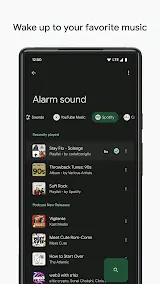
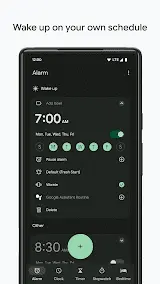
First and foremost, one of the impressive features of Clock is its comprehensive alarm system. Users can set multiple alarms, each with customizable settings such as specific days, recurring patterns, and alarm tones. This flexibility allows individuals to create personalized schedules that align with their unique routines. Additionally, Clock offers a gentle wake-up feature that gradually increases the alarm volume, easing users into their day without abrupt disruptions.
More than that, another remarkable feature is the integration with Google Assistant. Users can control their alarms and timers using voice commands, making it even more convenient for hands-free operation. Whether it is setting a reminder, snoozing an alarm, or starting a timer, Clock’s integration with Google Assistant provides seamless and efficient interaction.
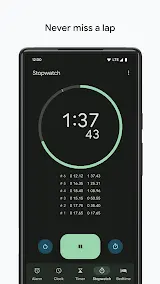
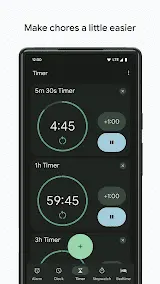
Not only that, but Clock also offers a stopwatch and timer functionality, which can be handy for various activities such as workouts, cooking, and presentations. The stopwatch accurately measures elapsed time, while the timer can be set for specific durations with optional alerts. These additional features make Clock a comprehensive time management tool for users with diverse needs.
All in all, Clock by Google LLC is a powerful time management application that provides users with a range of features to help them stay organized and efficient. With its versatile alarm system, integration with Google Assistant, and additional stopwatch and timer functionality, Clock offers a comprehensive solution for managing time effectively. While there are minor drawbacks, such as occasional syncing delays and limited customization options, the overall performance and user-friendly nature of Clock make it a top choice for those seeking a reliable and feature-rich clock app.
Clock Reviews
As far as the actual using experience is concerned, Clock has received positive reviews from users for its user-friendly interface and reliable performance. Many appreciate the app’s simplicity, making it easy to navigate and set alarms. Users also praise the integration with Google Assistant, which adds an extra level of convenience. Additionally, the gentle wake-up feature has received high praise for providing a smoother start to the day.
However, some users have mentioned minor issues with the app, such as occasional syncing delays between devices. While these concerns do not significantly impact the overall functionality of the app, they are worth noting. Overall, Clock is highly regarded for its versatility and ability to streamline time management.
Store Performance
On Google Play, the rating of Clock is 3.2 out of 4.0, with 576K user reviews and more than 1 billion installs. Unfortunately, Clock is not yet available in the iOS App Store, so there is currently no information for users to compare ratings and reviews.
Pros and Cons
Pros
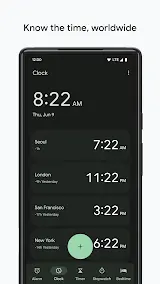
1. Clock is more than just an alarm clock. Its additional features like stopwatch, timer, and world clock make it a versatile tool for various time-management needs.
2. Clock works seamlessly with Google Assistant, allowing users to set alarms and timers using voice commands, making it even more convenient.
3. The app offers various customization options, allowing users to personalize the appearance and sound of alarms to suit their preferences.
4. Clock is known for its consistent performance and reliability. Users can trust that their alarms will go off on time and that timers will accurately keep track of their tasks.
Cons
1. While Clock is pre-installed on most Android devices, it does not offer an online sync feature, which means that users may lose their settings if they switch to a new device.
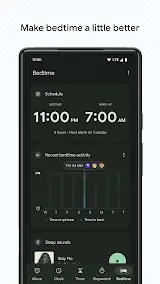
2. While Clock does offer a bedtime reminder feature, it lacks advanced sleep-tracking capabilities that could help users better understand their sleep patterns.
Additional Information
- Category: Tools
- Publish Date: 17 Apr,2025
- Size: 15 MB
- Requirements: Android 6.0+
- Developers: Visit the website
Screenshots



Download






Previous Versions
Disclaimer
· All APK files downloaded from AppDownList.com are safe. This site provides download links to Google Play and App Store. There is no unauthorized processing or modification of any APK packages, and we provide the same content as Google Play.
· This site and all content adheres strictly to all conventions in Google's Advertising Policy and Unwanted Software Policy.
· Please note that AppDownList only provides original APK packages. APK packages, trademarks and logos featured on AppDownList.com are owned by their original owners. If you own copyrighted material and would like to have it removed, please contact the person responsible for this site.
Similar Apps
My Spectrum



Soundcore

Epson iPrint

Smart View For Samsung TV
Update Software Latest

Amazon Fire TV
You may Like