Kodi
About Kodi
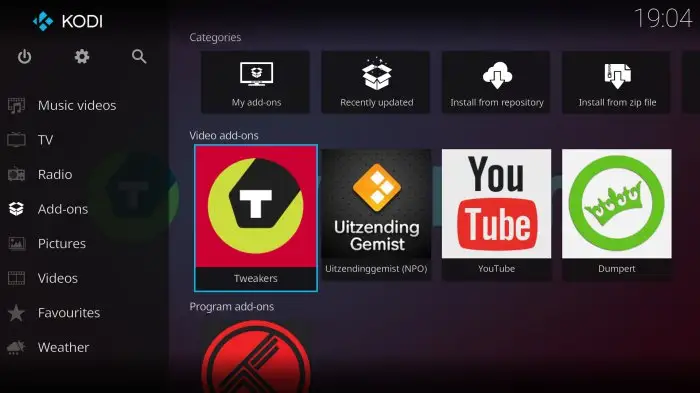
Officially, Kodi is a free and open-source media player software application developed by the Kodi Foundation. But in simple terms, Kodi is software that provides access to streaming media, including video and music, on virtually every major operating system or hundreds of devices, allowing you to watch anywhere. So, if you want to access streaming content, Kodi is a good choice.
It is worth mentioning that Kodi has its own interface and can be used with local and network storage services, but it should be noted that it does not provide content itself and must be implemented through some third-party plug-ins.
Then, as for the specific functions of this software, it can be said from two aspects. On the one hand, Kodi can play multiple formats such as: AAC, MP3, and OGG, and it also has smart playlists and the ability to tag different tracks. On the other hand, in terms of video, local playback supports ISO, 3D, and H.264 formats, and it can also stream content through the Internet to watch online videos. Once the videos are imported, Kodi automatically adds posters, trailers, schedules, and more to each video.
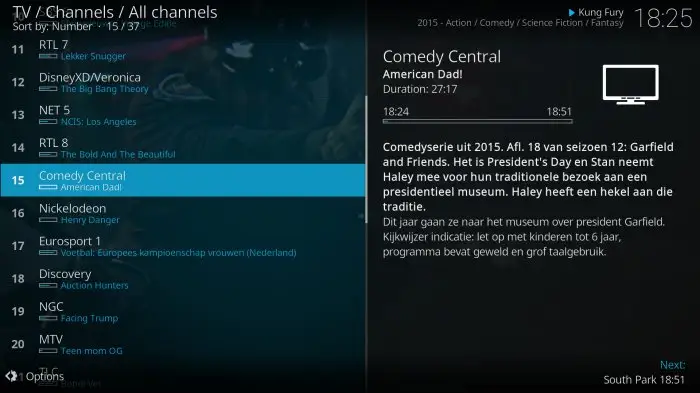
Of course, Kodi can also be used to watch TV shows, and allows you to record and store your favorite shows, and also supports functions such as posters, tags, program descriptions, and actors. There are also streaming images, providing slideshows and other features. Kodi also has a very nice feature that allows you to record its TV shows, however, you will need some backend service that supports this feature.
Kodi Reviews
Judging from the actual experience, the use of Kodi is very convenient and fast, the functions are relatively powerful, and it is very practical. What’s more, Kodi is a good choice for users who are looking for fluency in operation and clarity of playback. More importantly, its biggest feature is that there are many rich plug-ins in it, and these plug-ins support most of the multimedia files on the Internet, you can watch streaming TV, and even use it as a music library.
Store Performance
On iOS App Store, the rating of Kodi is 4.0 out of 5.0, with 202 user reviews. On Google Play, its rating is 3.8 out of 5.0, with 322, 000 user reviews and more than 50,000,000 installs. Based on the above data, we can find that this app has relatively high scores and ranks high in App Store. Of course, if you are a high-definition movie lover, then you must not miss the Kodi.
Pros and Cons
Pros
1. This application can bring you a more elegant and comfortable viewing experience.
2. The compatibility and scope of application are extremely wide. It can be used not only on Windows, Mac, and Linux computers, but also runs smoothly on Android, iOS phones or tablets, and many Android set-top boxes.
3. The app supports decoding and playback of almost all popular audio and video formats.
4. It can not only read the audio and video content of the local hard disk and mobile hard disk, but most importantly, it can also play and manage the content of other computers and NAS through the LAN.
5. It has rich and powerful plug-in extensions. Users can choose different plug-ins according to their own needs and preferences, and configure them to create the most suitable private audio-visual center for their own use.
6. It supports a variety of third-party plug-ins, and there are a huge number of plug-ins, which can realize almost all peripheral functions of watching movies.
Cons
It sometimes can’t navigate smoothly.
Additional Information
- Category: Video Players & Editors
- Publish Date: 8 Nov,2025
- Size: 65 MB
- Requirements: Android 5.0+
- Developers: Visit the website
Screenshots



Download






Previous Versions
Disclaimer
· All APK files downloaded from AppDownList.com are safe. This site provides download links to Google Play and App Store. There is no unauthorized processing or modification of any APK packages, and we provide the same content as Google Play.
· This site and all content adheres strictly to all conventions in Google's Advertising Policy and Unwanted Software Policy.
· Please note that AppDownList only provides original APK packages. APK packages, trademarks and logos featured on AppDownList.com are owned by their original owners. If you own copyrighted material and would like to have it removed, please contact the person responsible for this site.
Similar Apps

Web Video Cast | Browser to TV



Calculator - photo vault

BBC iPlayer
Roku Remote Control: RoByte

Rumble

YTV Player
You may Like